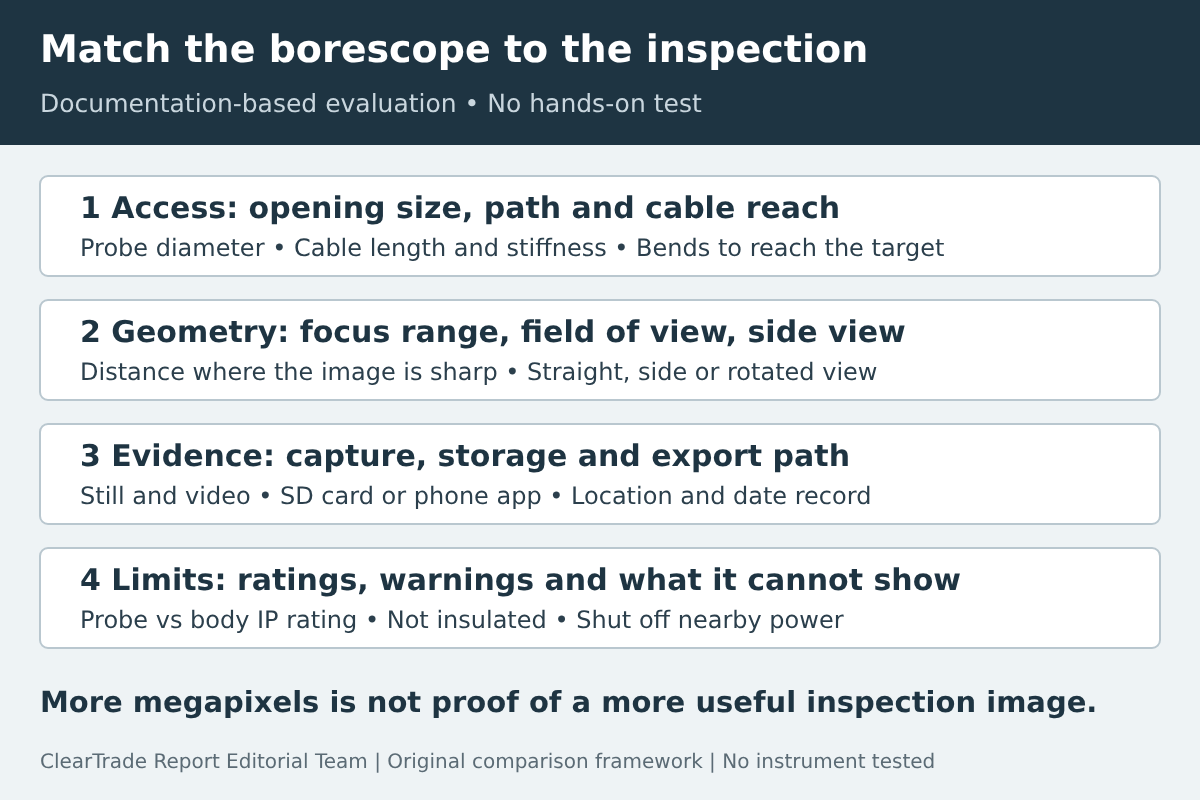
Pick an inspection borescope by whether it can reach the target, focus at the right distance, look in the right direction and save a usable record. A larger resolution number does not settle those questions, and several important specifications, especially focus range, are often missing from product pages.
Evidence label: Specification/documentation-based evaluation. ClearTrade Report Editorial Team checked manufacturer documents October 28, 2026. No hands-on testing or outside professional review was performed. The named tools below are documentation examples, not recommended purchases or a ranked shortlist. No product was supplied for this article, and this guide contains no affiliate links.
Start with the inspection task, not the resolution
Choose an inspection borescope by the opening it must enter, the path the probe must follow, the distance between the lens and the thing you need to see, and the record you need to keep afterward. Resolution, screen size and price matter only after those requirements are met.
Write the task down first: for example, look behind a finished wall through a small hole, check inside an equipment cabinet, or document a condition for a client file. Note the smallest opening, the approximate distance to the target, whether the target faces the lens or sits on a side wall, and whether the space could be wet, dirty, hot or near energized parts.
This guide covers compact handheld borescopes for cavities and equipment. It does not cover push-camera systems used for sewer and drain lines, which have their own reel, locating and reporting questions; see our sewer camera report guide for that work.
Check probe diameter against the actual opening
The camera head diameter sets the smallest hole the probe can enter. Manufacturers publish it in millimeters or inches, and the published examples here range from 7.9 mm to 9 mm. A smaller head can mean a smaller access hole, but it does not by itself say anything about image quality, focus range or lighting.
Measure the opening, then allow for accessories. A hook, magnet or mirror attachment can add width at the tip. If an attachment changes the effective diameter, check the manufacturer’s instructions before relying on it in a tight space.
Cable length and stiffness decide whether the head can reach and hold position. Manufacturers describe this differently: DEPSTECH calls the WF028 cable semi-rigid, and Klein describes the ET20 cable as an armored gooseneck. Compare the stated length with the real path, including bends, rather than the straight-line distance.
Read focus distance as a working range
Focus distance (also called focal distance or depth of field) is the range of distances at which the camera produces a usable sharp image. It is often the most useful specification for an inspection camera, and it is frequently missing.
The published examples show how different these ranges can be. Teslong lists separate depth-of-field ranges for each lens on its NTS500 triple-lens model: straight-viewing 1.18 to 3.15 in, side-viewing 0.79 to 1.97 in, and short-focus-viewing 0.59 to 1.18 in. DEPSTECH lists a focal distance of 7 to 40 cm for the WF028-5M. Klein’s ET20 page and manual and Milwaukee’s 2324-21 page, as we retrieved them, do not publish a focus range.
Compare a focus range with the distance you expect inside the cavity. A camera that focuses from 7 cm may not give a sharp image of a fitting 2 cm from the lens, and a short-focus lens may not resolve a target across an open cavity. If the range is not published, ask the manufacturer before treating the camera as suitable.
Separate field of view, side view and image rotation
Field of view describes how wide the lens sees. Teslong publishes 78° for each NTS500 lens; the other three examples did not publish a field of view on the pages we checked.
Side view, image rotation and tip articulation are different features. A side-viewing lens looks at a wall of the cavity without bending the cable. Image rotation turns the picture on the screen so it stays upright; Klein’s ET20 manual describes rotating the image clockwise in 90° steps. Tip articulation physically steers the camera head. None of the four documented examples here lists tip articulation, so do not assume a borescope can look around a corner unless the manufacturer says so.
If the target sits on a side wall, such as a connection inside a box or a joint inside a pipe, a side-viewing lens or an articulating tip is usually more relevant than a higher resolution figure.
Treat lighting as part of the image
Inspection cavities are dark, and the camera sees only what its lights reach. Look for adjustable brightness: close, reflective surfaces can wash out under full output, while deep cavities need more light.
Published examples: Klein lists six adjustable LEDs on the ET20; DEPSTECH lists six adjustable LEDs on the WF028; Teslong lists eight adjustable LEDs on the straight-viewing lens and one each on the side and short-focus lenses, plus a separate 1 W Cree LED flashlight. Milwaukee’s page did not give an LED count in our capture. Milwaukee’s head diameter and screen details also could not be captured verbatim, so they are left out here; check the current product page.
Plan how the image becomes evidence
An inspection image is only useful as evidence if it can be saved, labeled and shared. Check whether the tool records still images, video or both, where it stores them, and how files leave the device.
The examples use different paths. Milwaukee’s 2324-21 page says photos and videos can be shared via a 32G SD card, and its parts list shows an LCD display assembly. Teslong lists a 32 GB microSD card and a built-in 5-inch screen. The Klein ET20 has no screen of its own: its manual says the image can only be displayed in the Klein Tools Borescope app on an iOS or Android device, and the app stores and shares images and video. DEPSTECH’s WF028 also streams over WiFi to a phone app and states that it does not support a PC.
An app-based camera depends on a compatible phone, the current app and its permissions. A screen-based camera depends on card handling. Whichever applies, record the date, the location of the access point, the direction the camera faced and what the image shows, so another person can understand the file later.
Resolution figures need the same care. Klein lists 640 × 480. DEPSTECH lists a 5.0 MP sensor at 2592 × 1944. Teslong’s page lists 1920 × 1080 image capture, 1280 × 720 video and a 1.0 megapixel figure on the same page, which do not obviously agree. Treat a headline resolution as one input, not as proof of a clearer inspection image.
Read durability ratings and warnings exactly
An IP rating describes protection against dust and water under defined test conditions; it does not cover chemicals, oil, heat or electrical insulation. Check which part of the tool the rating covers. Klein rates the ET20 camera and cable IP67 and the body only IP42, and its manual still says not to immerse it or use it for underwater inspections. DEPSTECH lists IP67 for the WF028. Teslong lists IP67 (to 1 meter for up to 30 minutes, under IEC 60529) but does not say on the product page whether that applies to the probe, the monitor or both. Milwaukee’s page did not show an IP rating in our capture.
Klein’s ET20 manual states that the borescope, including the camera end, is not insulated. It says to avoid probing areas where energized conductive elements may be present and to shut off power to nearby work areas before starting, and not to probe moving machinery, areas with chemicals, or sources of heat. Read the exact manual for any tool you buy; do not assume one manufacturer’s warnings cover another product.
A borescope image is a visual record, not a test. It cannot confirm that a circuit is de-energized, that a joint is sound or that a material is dry. Use the right test instrument and, where needed, a qualified professional for those questions.
Use a specification record before comparing prices
The table below shows how the four documented examples line up. These are documentation examples, not recommended purchases, and blank values mean the manufacturer did not publish that figure on the page we checked, not that the feature is absent.
| Product (documentation example) | Probe diameter | Cable | Published focus range | View features | Image path |
|---|---|---|---|---|---|
| Milwaukee M12 M-Spector 360 kit, 2324-21 | Not confirmed in our capture | 10 ft camera cable (2324-20, Nov. 2022 parts list) | Not published | 360 in the product name; rotation details not captured verbatim; no tip articulation listed | LCD display (parts list); photos and videos shared via 32G SD card |
| Klein Tools ET20 | 0.35 in (9 mm) | 6 ft (1.8 m) armored gooseneck | Not published | Image rotation in 90° steps; no tip articulation listed | Phone app only (iOS/Android); app stores and shares |
| Teslong NTS500 triple-lens | 0.31 in (7.9 mm) | 3.2, 9.8 or 16.4 ft options | Straight 1.18–3.15 in; side 0.79–1.97 in; short-focus 0.59–1.18 in | Straight, side and short-focus lenses; 78° each | 5-inch screen; 32 GB microSD |
| DEPSTECH WF028-5M | 8.5 mm | 16.5 ft (5 m) semi-rigid | 7–40 cm | Single forward lens; field of view not published | WiFi to phone app; no PC support stated |
Before buying, add your own task requirements to the record: smallest opening, distance to target, view direction, required storage and sharing path, and site conditions. A tool that leaves a required field blank needs a direct answer from the manufacturer.
Know the limits of this guide
Evidence label: specification and documentation-based evaluation. ClearTrade Report Editorial Team checked manufacturer pages and the Klein ET20 manual on October 28, 2026. We did not test any of these tools. Product pages change, and some values differ between a manufacturer’s own pages; check the current documents for the exact model and cable length you plan to buy.
Primary references checked October 28, 2026: Milwaukee 2324-21 product page and the 2324-20/2323-20 service parts list dated November 2022; Klein Tools ET20 product page and ET20 instruction manual; Teslong NTS500 triple-lens product page; DEPSTECH WF028-5M product page. The Teslong user manual PDF could not be read, so no claim here relies on it. A missing value from our capture is not proof that a manufacturer never published it.
Frequently asked questions
Is a higher-resolution borescope always better for inspections?
No. Focus range, field of view, lighting and the view direction often decide whether the image is useful. A high resolution figure does not help if the target sits outside the camera's focus range or on a side wall the lens cannot see.
What is the most important borescope specification to check?
Start with probe diameter against the smallest opening and the published focus range against the distance to the target. If the manufacturer does not publish a focus range, ask before buying.
Can a borescope be used near live electrical parts?
Check the exact manual. Klein's ET20 manual says the borescope, including the camera end, is not insulated and says to shut off power to nearby work areas before starting. A borescope image does not confirm that a circuit is de-energized.
Does an IP67 rating mean a borescope can be used underwater?
Not necessarily. Check which part the rating covers and the manual's instructions. Klein rates the ET20 camera IP67 but its manual says not to use it for underwater inspections.
Disclaimer: This guide is general information based on manufacturer documentation, not professional, safety or purchasing advice for a specific site. Follow the manufacturer’s instructions and applicable codes, and use a qualified professional where a condition could affect safety. AI tools assisted with drafting. ClearTrade Report Editorial Team checked the cited sources and edited this guide. No hands-on inspection or testing was performed.
Need a qualified professional?
Trusted Pros uses visible license-verification states and never ranks paid listings above unpaid listings.