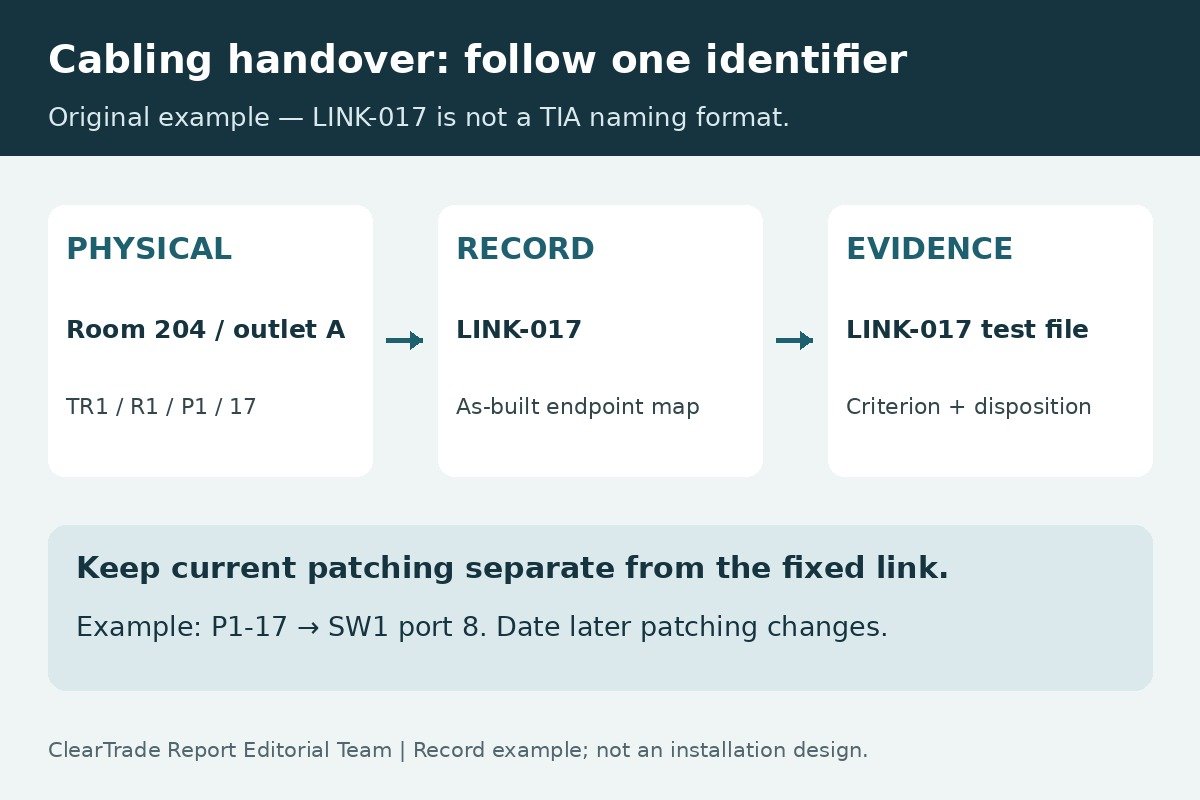
A useful cabling handover lets the owner start at a labeled outlet or fiber, find its other end, locate the matching test record and understand what was accepted. A folder of passing reports is difficult to use if its cable names do not match the building. Equally, a tidy port map does not prove the links met their specified test criteria.
Ask for one connected package: agreed identifiers, as-built endpoint and route records, test files, exceptions and any applicable warranty receipt. This is a practical document-review checklist for owners and IT managers, not a cabling certification or a field-test procedure. ClearTrade Report Editorial Team checked the primary references October 27, 2026; no hands-on testing or outside professional review was performed.
Agree on the identifiers before the handover
The TIA Fiber Optics Tech Consortium’s 606-D overview describes telecommunications administration through identifiers, records and relationships. Its scope includes infrastructure within and between buildings. That is broader than choosing a label font or numbering wall plates.
Have the project team identify the naming convention and applicable specification in writing. Ask how it distinguishes buildings, telecommunications spaces, racks, panels, ports, cables and fiber strands where relevant. The owner should be able to understand the scheme without relying on the installer’s memory.
Keep the edition question explicit. TIA’s October 20, 2026 announcement describes 606-E as a recirculation ballot and public-review document. A development announcement is not proof of a published requirement. This guide uses public scope information; it has not reviewed the paid 606 standard or verified a project’s compliance with it.
For an existing building, request a cross-reference between old and new identifiers. Do not silently reuse an identifier for a different run or erase the only link to historic records. Agree which old labels remain, which will be replaced and how the revision will be recorded.
Make the port map describe both ends
For each installed link, request the stable link identifier, both physical endpoints, media information and the related drawing and test-file references. An endpoint should be specific enough to locate the connection in the actual building: a room name alone may not distinguish several panels or outlets.
Keep fixed infrastructure and current patching distinguishable. The outlet-to-panel link can remain in place while the patch lead moves to a different switch port. Record those relationships separately so a switch replacement does not make the fixed cabling record unintelligible. Have the owner decide who maintains the operational patching information after handover.
For fiber, ask how cable, strand, adapter and equipment-port identifiers relate. For multiport outlets, show which position each identifier describes. Have the provider document spare, abandoned, reserved and untested links clearly rather than leaving blank entries that resemble missing data.
The following invented example shows a record chain, not a TIA naming format or evidence of a real installation:
| Record | Illustrative entry | Cross-check |
|---|---|---|
| Fixed link | LINK-017: Room 204 outlet A to TR1 rack R1 panel P1 port 17 | Both physical labels and the as-built record identify this run |
| Test reference | LINK-017 in the retained native test project | The test ID resolves to the same fixed link |
| Operational patching | P1-17 currently patched to switch SW1 port 8 | This changeable relationship is dated and kept separate |
If the outlet label instead reads LINK-071, the package has an identity conflict even if a report named LINK-017 says pass. Record and resolve the discrepancy before treating that report as evidence for the outlet. This example does not instruct anyone to unplug a live service to investigate it.
Keep the exact cable data sheet with the as-installed route. Our plenum, riser and outdoor cable guide separates flame classification, sunlight exposure, wet-location and burial evidence so environmental requirements remain visible in the handover record.
Ask for as-built records, not only the design
Request the final installed arrangement and a revision date. Have the installer distinguish planned routes, documented changes and anything that was not verified. Photographs can help locate panels and labels, but a collection of images without identifiers or locations is not a usable port schedule.
FOA’s installation-deliverables guidance emphasizes comprehensive route/component information, understandable documentation and test data reviewed in the project context. For an owner, the practical question is whether another authorized technician can use the delivered records after the original team leaves.
Ask the provider to connect relevant pathway, splice and termination records to the link schedule. Keep any required penetration, firestopping or other construction closeout evidence with the appropriate project records; a cable test does not establish that those separate work items were accepted. This checklist does not determine their technical requirements.
Where only part of a building was included, mark that boundary. Distinguish new work from existing infrastructure surveyed for reference. A drawing showing an old cable should not imply that it was included in the new installation’s testing or warranty.
Retain native test data and a readable summary
Ask for the tester’s native project files as well as an accessible summary when required by the project. Fluke Networks’ LinkWare PC description describes organizing, reviewing, reporting and archiving results from supported testers. That illustrates why the underlying project file can be useful beyond a printed pass/fail list; it is not a recommendation to purchase software or a claim that every tester uses the same format.
Have the summary identify each tested link and the criterion used, with the dates and equipment information needed for review. Ask the provider to explain the tested boundary—for example, whether the copper result is for the specified permanent link or a channel arrangement. The report’s title should not substitute for checking its selected limit and setup.
Reconcile the inventory with the files. If 48 installed links are listed and 46 result IDs are delivered, the two unmatched entries need a disposition. Also check for duplicate IDs and for files referring to links absent from the final schedule. These invented counts describe a completeness check, not an acceptable sampling percentage.
Keep corrected results linked to their predecessors and explanations. A repeated test with a new name should not obscure which installed link it covers. For fiber-specific interpretation of calculations, reference methods and measurements, use our fiber loss-budget acceptance guide.
Verify the actual warranty deliverables
A promised manufacturer system warranty needs its own evidence. Ask which program applies, what was submitted and whether the manufacturer issued the expected document. Keep a contractor’s workmanship commitment distinguishable from a manufacturer’s system coverage and from an ordinary product warranty.
As a labeled manufacturer example, Connectix’s warranty-request page requires native tester results, says PDFs alone are inadequate for its warranty process, and addresses test type and calibration evidence. Those are Connectix program conditions, not universal rules for every cabling manufacturer or a determination of legal rights.
Request the applicable terms and the actual project receipt or certificate rather than treating this example as proof of eligibility. If registration is pending, record it as pending with the responsible party and next step. A complete file transfer does not establish that a warranty was approved, and this article does not interpret coverage for a particular claim.
Walk through the package with the operating team
Arrange an agreed document-and-label walkthrough that avoids disrupting active services. Start from a selected outlet record and find its panel entry, drawing and matching result. Then start from a selected result and work back to its endpoint record. Have the responsible project reviewer decide the appropriate verification scope; this article supplies no universal sample size or certification procedure.
Try opening the delivered files with the owner’s retained tools and authorized accounts. Record the software needed to view native files and any access or licensing dependency. A link in a contractor’s account is not the same as a retained copy the owner can actually open. Keep credentials out of broadly circulated drawings and schedules.
Use the walkthrough to record exceptions rather than improvise an acceptance decision. A mismatch may concern a label, map, test identifier, missing deliverable or unresolved technical issue. Assign an owner and required evidence for closure. Verify the corrected revision and distribute it to the operating team.
Close the record and keep it current
Use a short deliverables register to separate receipt from review and acceptance. This original checklist is a record-management aid, not a contractual acceptance form:
| Deliverable | Evidence to retain | Unresolved item to identify |
|---|---|---|
| Labels and identifiers | Agreed scheme, label schedule and cross-reference | Missing, duplicate or conflicting names |
| Port and route records | As-built maps, endpoint schedule and dated patching record | Unverified routes or undocumented changes |
| Tests | Native project, summary, criteria and review disposition | Missing results, failures or unexplained retests |
| Warranty | Applicable terms, submission status and issued document if approved | Pending approval or excluded work |
| Owner access | Working retained files, viewing requirements and update owner | Expiring access or unsupported file formats |
Record who can revise the authoritative copy and how moves, additions and changes will be documented. Keep the accepted handover as a baseline; date subsequent changes so later troubleshooting can distinguish the installed project from current operational patching. A spreadsheet may be sufficient for some owners, but the useful test is whether the chosen system is maintained and understandable.
Sources and scope
Primary references checked October 27, 2026: TIA FOTC’s public 606-D overview; TIA’s October 20, 2026 606-E review announcement; FOA installation-deliverables guidance; Fluke LinkWare PC documentation; Connectix warranty-request instructions. Public summaries are not a review of paid standards. The example identifiers, counts, worksheets and workflow are original editorial examples, not a claim of standards compliance, testing, professional review, product endorsement or warranty acceptance.
For access-control readers, retain separate protocol and configuration evidence alongside the cabling records. Our OSDP versus Wiegand guide explains the reader-controller Secure Channel boundary and the acceptance evidence to request; a cable report does not establish encryption state.
Frequently asked questions
Is a PDF of passing tests a complete cabling handover?
Not by itself. Reconcile the reports with the installed identifiers, endpoint and route records, required native files, exceptions and any applicable warranty deliverables.
Should the fixed-link identifier change when a switch port changes?
Keep the fixed infrastructure record distinguishable from operational patching. Follow the project’s agreed naming convention and record dated patching changes without losing the fixed-link history.
Does receiving test files prove a manufacturer warranty was issued?
No. Request the applicable program terms and actual submission or approval evidence. Record pending registration or approval as pending rather than assuming coverage.
What should happen when a label and test ID disagree?
Record the mismatch and have the responsible provider resolve it with traceable evidence. Retain the correction history and verify the revised record before relying on the test for that endpoint.
AI tools assisted with drafting. ClearTrade Report Editorial Team checked the cited sources and edited this guide. No hands-on inspection or testing was performed.
Need a qualified professional?
Trusted Pros uses visible license-verification states and never ranks paid listings above unpaid listings.